Studies show that satisfied employees are measurably more productive at work. Good ergonomics in the home office not only create a pleasant atmosphere but also ensure higher productivity and better work results. In this article, we show you how to optimize your home workspace through ergonomic resolutions. With a height-adjustable desk and an optimally adjusted office chair, you relieve your back and neck – these adjustments increase your well-being and performance in the long term. Here are five concrete tips to help you start the autumn healthy and productive.
An ergonomically set up home office with a suitable desk and chair promotes healthy and productive work. With the right settings, you prevent back pain and stay focused longer.
1. Ergonomic office chair: Sit correctly, relieve your back and neck
A suitable office chair is the foundation for healthy work. Look for an ergonomic desk chair with adjustable seat height, backrest, and if possible, a lumbar support. When used correctly, a good office chair strengthens the back and distributes the load on the intervertebral discs evenly – this helps avoid posture damage and back pain.
• Adjust the seat height: Your thighs should be horizontal and both feet flat on the floor. Ideally, your knees should form a 90° angle. This distributes the weight optimally and prevents blood flow from being restricted.
• Backrest & lumbar support: Lean against the backrest, which supports the natural S-curve of your spine. A curve in the lower back area stabilizes the lumbar vertebrae. Set the backrest slightly tilted back so that you sit upright but relaxed.
• Armrests & posture: You should adjust the armrests so that your forearms rest comfortably and your shoulders remain relaxed. Ideally, your elbows and the tabletop are at the same height. This helps prevent neck and shoulder tension. Keep your head straight and your gaze forward (not constantly downward) to relieve your neck and cervical spine.
A well-adjusted chair prevents poor posture, supports your body, and also allows for longer work without tension. However, always stand up again and again or change your sitting position to give your body movement (see tip 5).
2. Height-adjustable desk: Use the change between sitting and standing
Prolonged, uninterrupted sitting is considered harmful to health – a height-adjustable desk provides a solution here. By regularly changing your working position from sitting to standing, you prevent a lack of movement. Height-adjustable desks make it easier to move more frequently despite office work. Not only the body benefits from this, but cognitive performance can also be increased. Experts recommend as a rule of thumb to sit for about 60% of the working time, stand for 30%, and spend 10% moving – this keeps the circulation and muscles active without overexerting yourself.
Scientific studies support the benefits: A one-year study found that users of height-adjustable workstations were significantly more productive and focused and also felt better about their health. At the same time, 47% fewer people complained of back, shoulder, or neck pain after working at sit-stand desks for a few months – a clear indication that changing your working posture effectively relieves the back and neck. Regular standing also stimulates blood circulation, which prevents fatigue.
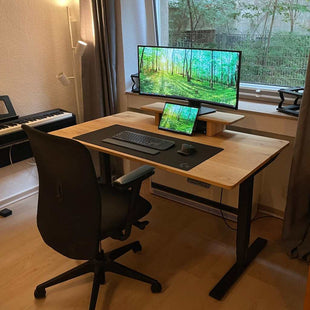
A height-adjustable table from our range offers you all these benefits: Our Deskolonia solid wood desk is electrically adjustable and allows for a quick change between sitting and standing positions. This way, you can improve your posture, promote blood circulation, and ultimately increase performance. For example, start the day standing up to begin full of energy, and later switch to a comfortable sitting position when you want to focus. Your back will be relieved and you will be able to work overall more alert and productive.
Regular change of posture: A height-adjustable desk allows for alternating sitting and standing. This promotes blood circulation and can counteract back pain and fatigue.
3. Position the screen ergonomically: Keep eye health & posture in mind
You should also set up your screen ergonomically, because incorrect monitor alignment quickly leads to neck tension or eye problems. Ideally, an external monitor with a screen size of approx. 24 inches or larger, positioned at eye level. This means: The top edge of the screen is approximately at eye level, so that you look slightly downward. Maintain a viewing distance of approximately 50–70 cm (one arm's length). This prevents you from constantly tilting your head forward or straining your eyes.
Make sure that the monitor is flicker-free and that no reflective glare occurs (place windows to the side of the screen, not directly behind it). Blue light filters or a night mode in the evening reduce the proportion of blue light on the screen – this protects the eyes and can even prevent eye irritation, headaches, and sleep disorders. Especially in the darker autumn months, when artificial light is used more often, it is worth using warm light and filters to keep eye fatigue low.
Additional tip: If you work on a laptop for a long time, use a laptop stand or a separate monitor solution so that you do not constantly look down. In combination with an external keyboard and mouse (see next tip), you achieve a similarly healthy posture as at a fixed PC workstation. Your cervical spine will thank you, because it remains in a neutral position instead of being constantly bent over.
4. Ergonomic keyboard and mouse: Protect hands and wrists
Often underestimated, but important for long-term pain-free work, are the input devices. You use the keyboard and mouse daily for hours – ergonomic equipment is worth it here to avoid mouse arm (RSI syndrome) or tendonitis. Use an external keyboard if possible (especially a must for laptops) and an ergonomic mouse shape:
• Keyboard: An ergonomic keyboard is characterized by a split or curved shape that allows the hands to maintain a more natural position. A wrist rest is also helpful – it supports the wrists and prevents them from bending while typing. Place the keyboard about 10–15 cm from the edge of the table so that your wrists can rest comfortably. While typing, your forearms should be approximately in line with the armrests of your chair, so that your shoulders and neck remain relaxed.
• Mouse: Opt for an ergonomic mouse, e.g., a vertical mouse. With a conventional flat mouse, the forearm and hand are unnaturally twisted, which permanently strains the muscles and tendons. A vertical mouse, on the other hand, lets your hand rest in a vertical "handshake" position. This more natural position significantly reduces strain on the forearm and prevents mouse arm. Also make sure to keep the mouse close to the body and at the same height as the keyboard to avoid overreaching. In between, you can loosen your hands – briefly shaking them out and stretching your fingers relaxes the muscles additionally.
With suitable input devices, even long computer workdays become more pleasant: You work more precisely and quickly when no pain or numbness in your hands and wrists distracts you.
5. Take movement breaks: Promote dynamism in everyday work
Ergonomics does not only mean setting up furniture and devices correctly, but also ensuring sufficient movement and rest. Especially in autumn, when the days get darker, you tend to stay at your desk for a long time. Consciously take regular breaks to give your body and mind a short break – this is proven to increase productivity. Even a 5–10 minute break per hour can significantly improve concentration. Stand up, stretch, or walk a few steps through the room. Also, some simple stretching exercises (for neck, shoulders, back) release muscle tension and get the circulation going. After that, you will be able to continue working with a fresh head.
Also try to integrate movement into your everyday work: Maybe you can take phone calls standing up or take a short walk during your lunch break. Studies show that active breaks not only promote physical health, but also boost creativity and mood. It is best to plan your breaks in advance – e.g., with the Pomodoro technique (25 minutes work, 5 minutes break) or by blocking fixed movement times for each workday. The important thing is to actually take the breaks. Your body will thank you, because regular short breaks prevent fatigue and help maintain performance throughout the day.
If you have a height-adjustable desk, you can even actively incorporate it into your breaks: Raise the desk and use it as a standing desk for small loosening exercises or to hold, for example, a short video conference standing up. This way, you stay in motion, even when you work.
Conclusion
With these ergonomic home office resolutions, you will get through the autumn healthier and more productive. By optimally setting up your workspace – from the chair to the desk to the screen and accessories – you create the foundation for efficient and pain-free work. You relieve your back and neck, protect your eyes and joints, and feel overall more comfortable at work. This, in turn, has a positive effect on your satisfaction and motivation – and thus also on your productivity. So start the new season now by ergonomically upgrading your home office space. Your body and your work results will thank you! Good luck and a healthy, productive autumn in the home office.